










Build a live search with PHP MySQL AJAX for an e-commerce website. Learn real-time product search with PHP, MySQLi, AJAX, JavaScript and responsive UI.
Live Search with PHP MySQL AJAX: Powerful E-commerce Tutorial
Live search with PHP MySQL AJAX is a useful feature for modern e-commerce websites. Instead of forcing visitors to type a complete product name and submit a traditional search form, live search can display matching products while they are typing.
In this tutorial, we will build a simple product-search system using PHP, MySQL, AJAX, JavaScript, HTML and CSS.
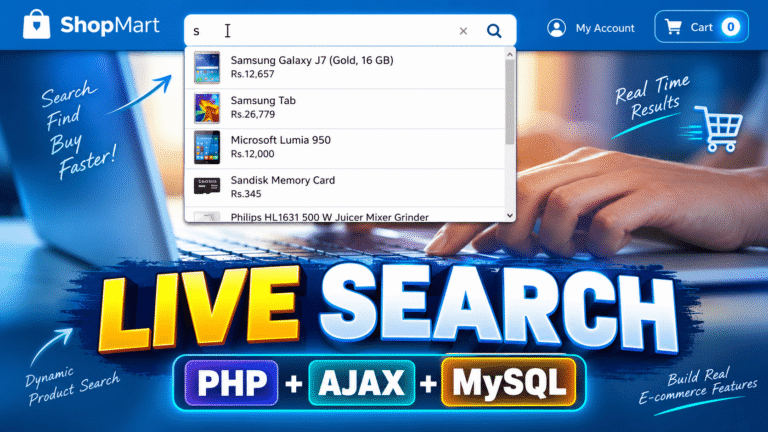
The project is designed around an e-commerce interface where users can type something such as s or sam and immediately see matching products with their names, prices and images.
The biggest advantage is that the page does not need to reload every time the user searches.
What We Are Building
Our final project contains a search box at the top of an e-commerce website.
When the visitor starts typing:
san AJAX request is sent to the PHP backend.
The PHP file searches the product table in MySQL and returns matching products.
The results are then displayed below the search box.
This creates a smooth search-as-you-type experience.
The basic flow is:
User types → AJAX request → PHP → MySQL → Matching products → Results displayed
This approach is simple enough for beginners while also demonstrating an important technique used in real-world web applications.
Why Use AJAX for Live Search?
A traditional search form normally works like this:
- User enters a keyword.
- User clicks Search.
- Browser sends a request.
- Server processes the request.
- A new page is loaded.
With AJAX, the process becomes much smoother.
The browser can communicate with the server in the background while the current page remains visible.
That means users can continue interacting with the page while search results are being updated.
For an e-commerce website, this can make product discovery much faster and more convenient.
Project Files
The example project is divided into several small files so that each part has a clear responsibility.
1. config.php
This file contains the MySQL database connection.
<?php

$host = "localhost";
$user = "root";
$password = "";
$database = "live_search";

$conn = new mysqli($host, $user, $password, $database);

if ($conn->connect_error) {
    die("Database connection failed: " . $conn->connect_error);
}

$conn->set_charset("utf8mb4");
Using mysqli instead of the older mysql_* functions makes the project compatible with modern PHP versions.
2. head.php
This file contains the common HTML structure and required frontend resources.
<!DOCTYPE html>
<html lang="en">
<head>
    <meta charset="UTF-8">
    <meta name="viewport" content="width=device-width, initial-scale=1.0">
    <title>Live Search</title>
    <link rel="stylesheet" href="style.css">
</head>
Keeping common markup in a separate file makes the project easier to maintain.
3. index.php
The main page contains the search interface.
<input
    type="text"
    id="search"
    placeholder="Search products..."
    autocomplete="off"
>

<div id="searchResult"></div>
The search input is monitored using JavaScript.
Whenever the user enters text, the search function can send the keyword to the PHP backend.
Live Search with PHP MySQL AJAX
The important part of this project is the communication between JavaScript and PHP.
For example, JavaScript can send the search keyword to:
call_ajax.phpThe PHP file receives that keyword and searches the database.
A simplified AJAX request looks like this:
$("#search").keyup(function () {

    var keyword = $(this).val();

    $.ajax({
        url: "call_ajax.php",
        type: "POST",
        data: {
            search: keyword
        },
        success: function (response) {
            $("#searchResult").html(response);
        }
    });

});
As the user types, the server receives the current search term.
The response is then inserted into the result container without refreshing the entire page.
4. call_ajax.php
This file handles the search request.
<?php

include "config.php";

$search = $_POST['search'] ?? '';

$search = trim($search);

if ($search === '') {
    exit;
}

$stmt = $conn->prepare(
    "SELECT id, name, price, image
     FROM products
     WHERE name LIKE ?
     ORDER BY name ASC
     LIMIT 10"
);

$keyword = "%" . $search . "%";

$stmt->bind_param("s", $keyword);
$stmt->execute();

$result = $stmt->get_result();

while ($row = $result->fetch_assoc()) {
    ?>

    <div class="search-item">
        <img src="images/<?php echo htmlspecialchars($row['image']); ?>" alt="">

        <div>
            <strong>
                <?php echo htmlspecialchars($row['name']); ?>
            </strong>

            <div>
                Rs.<?php echo htmlspecialchars($row['price']); ?>
            </div>
        </div>
    </div>

    <?php
}
Here, the search value is passed to a prepared statement rather than directly concatenating user input into SQL.
The % characters allow MySQL’s LIKE condition to find the search text within the product name. MySQL String Comparison Functions
5. style.css
The CSS controls the appearance of the search box and product suggestions.
#searchResult {
    position: absolute;
    width: 100%;
    background: #fff;
    border: 1px solid #ddd;
    max-height: 350px;
    overflow-y: auto;
}

.search-item {
    display: flex;
    align-items: center;
    gap: 12px;
    padding: 10px;
    border-bottom: 1px solid #eee;
}

.search-item img {
    width: 45px;
    height: 45px;
    object-fit: cover;
}
The result panel can be positioned directly below the search field, giving it the appearance of an autocomplete dropdown.
MySQL Database Structure
The project includes a schema.sql file that creates the product table and inserts sample products.
A simple structure can contain:
CREATE TABLE products (
    id INT AUTO_INCREMENT PRIMARY KEY,
    name VARCHAR(255) NOT NULL,
    price DECIMAL(10,2) NOT NULL,
    image VARCHAR(255) DEFAULT NULL
);
You can then add products such as smartphones, tablets, memory cards and other e-commerce products.
Once the database is populated, the AJAX search can retrieve those records dynamically.
Making the Search More User-Friendly
There are several small improvements that can make the feature feel more professional.
First, don’t display an empty result panel when the search field is empty.
Second, limit the number of results displayed at one time. This prevents a huge list from appearing when a common character is entered.
Third, display useful information such as:
- Product image
- Product name
- Product price
- Availability
- Product category
You can also make every search result clickable so that selecting a product takes the visitor directly to its product page.
Security Improvements
When working with database searches, security should not be ignored.
The updated project uses MySQLi prepared statements instead of directly inserting user input into an SQL query.
PHP provides MySQLi prepared-statement support for separating SQL statements from supplied parameter values. PHP MySQLi Prepared Statements
Output should also be escaped when displaying database values inside HTML.
For example:
echo htmlspecialchars($row['name']);This is particularly important when displaying user-controlled or externally supplied data.
For larger production applications, you should also consider authentication, authorization, validation, rate limiting and appropriate database indexing.
Where This Feature Can Be Used
A live search isn’t limited to online stores.
You can use the same concept for:
- E-commerce websites
- Product catalogs
- Employee directories
- Student management systems
- Customer databases
- Blog searches
- Job portals
- Inventory systems
- Restaurant menus
- Real-estate listings
The backend logic can remain almost identical while the database query and displayed fields change according to the project.
Recommended Tutorial
Recommended External Resources
For readers who want to learn more, link to authoritative documentation such as:
These resources provide additional technical information for developers who want to understand the underlying APIs.
Watch the Video Tutorial
🚀 Build Live Search with PHP, MySQL & AJAX
Follow the complete practical tutorial and build the e-commerce live-search feature step by step.
Final Result
After completing the project, visitors can type a product name into the search box and receive matching results immediately.
The combination of PHP, MySQL, AJAX and JavaScript provides a straightforward way to create this type of interactive functionality.
The project is also a good starting point for developers who want to move beyond basic PHP forms and begin building more interactive web applications.
You can extend the same project with category filters, price filters, pagination, product suggestions, search history, sorting and a complete product-details page.
If you’re learning PHP and building e-commerce projects, this live search with PHP MySQL AJAX example is a practical project to understand how frontend and backend components communicate without requiring a full-page reload.
